

Use Your Liberty Home Page
Liberty includes a perfect “shop front” marketing tool. It’s called the Home page. It’s not just a place where users search the catalog.
Apart from searches, there is so much more you can do with your Home page. It’s how you can raise and maintain your library’s profile and market your library.
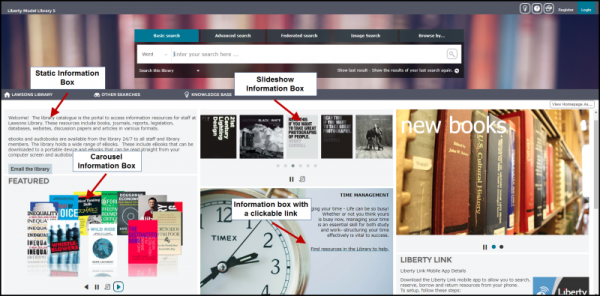
It’s a space where library staff can create and customize information boxes. These boxes are versatile and easy to edit once you’ve created them.
You can design Information boxes to display as:
- Carousels.
- Slideshows.
- Static information displays.
They can include:
- Videos.
- Images.
- Links to sites of interest to your users.
- Advertised events or training.
- RSS feeds.
- General information such as opening hours.
- User instructions on setting up the Liberty Link mobile app.
Best of all, staff can personalize the display of information boxes based on who logs in. For example:
- Attorneys.
- Medical teams.
- Organizational staff working on specific projects.
- Community workers operating in specialized areas.
- Students enrolled in specific courses.
Use the Professional Attention-Grabbing Interest Update Notifications
Be proactive. It’s a great way to sell the value of your library and staff to users. Library staff can create Interests and select them on borrower records. The system will automatically notify those borrowers of new resources that match their interests.
If your resource records include cover images, they will be included in Interest emails. They look professional and grab the attention of your users.